Most businesses start thinking seriously about holiday marketing when the holiday season is already here. Budgets increase, promotions go live, traffic picks up, and suddenly everyone wants to know which campaigns are working. The problem is that this is also when many businesses discover that their tracking is wrong, their landing pages are weak, their remarketing audiences are too small, or the campaigns they planned to scale have never really been tested.
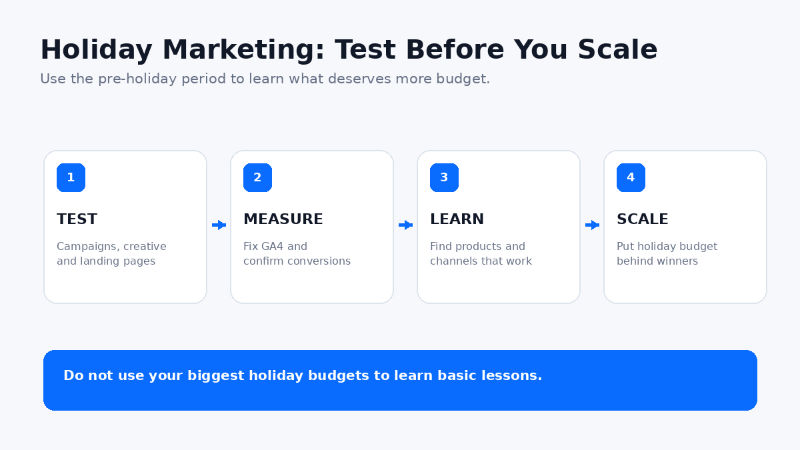
I would rather learn those lessons before the expensive part of the year begins. September and October give you time to test campaigns, fix analytics, build audiences, improve landing pages, and understand which products or services are already showing signs of demand. Then, when holiday budgets increase, you are putting more money behind things that have already shown they can work instead of using your biggest spend of the year to learn basic lessons.
The basic idea is simple: test early, measure correctly, identify the winners, and then put more holiday budget behind what is working.
Test Paid Search Before You Increase the Budget
If you know you are going to spend more on Google Ads or Microsoft Ads during the holiday season, start testing before the holiday rush. You do not need to spend your full November budget in September. The point is to learn which keywords, search terms, ads, audiences, and landing pages are actually producing useful traffic and conversions.
For example, imagine a campaign is spending $50 a day and producing very few sales. Increasing that same campaign to $500 a day in November is unlikely to fix the underlying problem. You may simply buy ten times more of the same poor traffic. Testing early gives you time to review search terms, add negative keywords, improve ad copy, separate high-value products, adjust bidding, and fix the landing page before you scale.
It is also a good time to make sure campaign URLs are consistently tagged. My free UTM builder can help create clean campaign tracking URLs for email, social, display, and other channels where you control the destination URL.
Test Creative and Audiences Before Holiday Competition Increases
Holiday advertising is not only about paid search. Meta, YouTube, display, video, and other upper-funnel channels can help introduce products before shoppers are ready to buy. The weeks leading into Q4 are a good time to test different creative concepts, offers, audiences, and messages while you still have room to make changes.
You might learn that a product-focused ad performs better than a lifestyle ad, or that a simple benefit-driven message gets more engagement than a discount message. You may find that one audience visits the site but rarely converts, while another audience produces fewer clicks but much stronger sales. Those are useful lessons to have before media costs and internal pressure increase.
The goal of every early test does not have to be immediate holiday revenue. Some campaigns can be used to build awareness and create qualified remarketing audiences that become much more valuable later in the season.
Build Remarketing Audiences Before You Need Them
Someone researching a product in September may not buy until November. If your remarketing audiences are already working, that visitor can become part of a much more valuable audience when your holiday promotion begins. If you wait until Black Friday week to start building audiences, you are starting from zero at the exact moment competition is highest.
Make sure the basic audience structure is in place now. Depending on your business, that might include product viewers, cart visitors, past purchasers, form starters, video viewers, email subscribers, or visitors to specific high-value service pages. You can then decide which groups should be excluded, which deserve a different offer, and how long someone should remain in an audience.
Test Landing Pages With Real Traffic
A landing page that looks good in a design review can still perform poorly with real users. Before sending your largest holiday campaigns to a page, send some real traffic through it. Check the page on mobile devices, make sure the primary call to action is obvious, confirm forms actually submit, and look for anything that could create unnecessary friction.
For ecommerce sites, pay attention to product information, pricing, shipping messages, availability, reviews, promotional language, and the path into checkout. For lead-generation sites, make sure visitors can quickly understand the service, the geographic area you serve, and what happens after they submit the form.
You do not need a complicated testing platform to catch obvious problems. Sometimes the most valuable test is simply looking at actual traffic and realizing that users are landing on the wrong page, dropping out on mobile, or clicking an element that does not work as expected.
Fix GA4 Problems Before Holiday Traffic Picks Up
Holiday season is a terrible time to discover that your analytics have been wrong for the last two months. Before traffic and media budgets increase, make sure GA4 is collecting the data you actually need to make decisions. Check key events and conversions, ecommerce tracking, form submissions, campaign attribution, referral traffic, and any obvious duplicate or missing events.
If you use Google Tag Manager, verify that important tags are firing where they should and that consent settings are not preventing the data you expect from being collected. If your business relies on leads, confirm that the lead event is tied to a real completed action rather than simply a page view or button click. For ecommerce, confirm that transactions, revenue, products, and quantities are showing correctly.
The goal is not just to make GA4 technically correct. You want to be confident that when holiday traffic increases, you can answer basic business questions quickly. Which channels are driving revenue? Which products are converting? Which landing pages are working? Which campaigns are getting traffic but not producing sales?
Get a Free Google Data Studio Dashboard Ready
This is also a good time to get a simple reporting dashboard in place. Google Data Studio is a no-cost reporting tool that can bring information from sources such as GA4, Google Ads, Google Search Console, and Google Sheets into one report. You do not need an expensive business intelligence platform to create a dashboard that is useful during the holiday season.
The important part is to keep the dashboard focused. You probably do not need fifty charts. Start with the information you will actually use to make decisions: traffic, revenue, conversions, conversion rate, ROAS, product performance, landing pages, and channel performance. For ecommerce businesses, I would also create a product-level view so you can quickly see which products are getting attention and which ones are actually selling.
Getting the dashboard working early gives you a baseline before holiday traffic changes everything. If one product is already getting strong traffic and converting well, that may be an early signal to increase media support, create additional creative, or feature it more prominently. If another product is receiving plenty of traffic but almost no sales, you have time to investigate the product page, pricing, shipping offer, or messaging before putting more money behind it.
I am going to cover the dashboard setup in a separate article, but the takeaway for holiday preparation is simple: get the reporting ready before everyone starts asking for answers.

Review Organic Search Before You Change Holiday Pages
Holiday promotions often lead to rushed website changes. Teams create new pages, rename old pages, change URLs, remove content, and update navigation. Before doing that, check whether any existing holiday or promotional pages already have search visibility. If a Black Friday page from last year still has backlinks or rankings, you may be better off updating that existing URL instead of creating a brand-new page.
Google has specifically recommended creating promotional pages early, linking to them from the site, and using recurring URLs for annual events such as Black Friday rather than creating a completely new URL every year. You can read Google’s guidance on deal pages and seasonal events.
Before changing important pages, look at Google Search Console, current organic landing pages, and existing rankings. If you are making larger structural changes, a website SEO audit can also help identify pages and technical issues that should be protected before the busiest part of the year.
Create Seasonal Pages Early
If you already know you will have a Black Friday, Cyber Monday, holiday gift, or year-end sale page, you do not have to wait until the morning the sale starts to publish the URL. The final pricing and promotional details may still be private, but the page structure, technical setup, internal links, and SEO elements can be prepared ahead of time.
This gives search engines time to discover the page, gives your team time to test it, and gives you an opportunity to catch problems before the promotion is live. It also prevents the common holiday scramble where marketing, development, ecommerce, analytics, and paid media teams are all trying to make changes at the same time.
When you are writing page titles and meta descriptions for those promotional pages, you can use my free SERP snippet preview tool to check how the title and description may appear in search before publishing.
Test the Website Before Traffic Increases
Holiday marketing cannot fix a website that does not work. Test important forms, checkout flows, coupon codes, promotional banners, navigation, shipping calculators, payment options, and mobile layouts before traffic increases. If you expect a significant traffic spike, this is also the time to talk with your hosting or development team about caching, performance, and anything else that could become a problem under heavier load.
I also like to test the full customer journey instead of individual pieces. Click an ad, land on the page, choose a product, add it to the cart, complete a purchase, and then verify that the transaction appears correctly in GA4 and the advertising platform. For a lead-generation business, submit the form and make sure the lead reaches the right person. That simple end-to-end test catches a surprising number of problems.
Know Your Baseline Before the Holiday Spike
It is difficult to know whether holiday performance is good if you do not know what normal performance looks like. Before Q4, document your current conversion rate, average order value, cost per acquisition, ROAS, organic traffic, paid traffic, top products, and top landing pages. Those numbers give you something meaningful to compare against once promotions and media budgets increase.
They also help prevent bad decisions. A product that generates twice as much revenue during a holiday promotion may look like a huge success, but if media spend increased five times, the economics may tell a different story. A dashboard with a clean baseline makes those conversations much easier.
Decide What a Successful Test Actually Means
Every test should have a purpose. Are you trying to generate purchases, leads, qualified site traffic, email signups, audience growth, or product awareness? The answer changes how you evaluate performance. A prospecting video campaign probably should not be judged exactly the same way as a branded paid-search campaign aimed at people already looking for your product.
Set the goal before the test begins and decide what would cause you to scale, change, or stop the campaign. That makes the holiday budget conversation much more objective because you are not deciding what worked after you already know the results.
Use the Pre-Holiday Period to Learn
The most important holiday marketing work often happens before the holiday campaigns officially begin. Use the weeks leading into Q4 to learn which campaigns are producing quality traffic, which creative gets attention, which products are converting, whether your analytics can be trusted, and whether the website can handle the customer journey you are about to promote.
Do not use your biggest budgets to learn basic lessons. Test early, fix the problems, get the reporting ready, and then put more money behind the things that are already showing signs of success. If you need help reviewing paid media, SEO, analytics, or your overall holiday strategy, you can learn more about my digital marketing services or contact me.
Frequently Asked Questions
When should I start preparing holiday marketing campaigns?
For many businesses, September and October are good months to begin testing and preparing. The exact timing depends on the sales cycle, but the goal is to have enough time to learn from campaigns, fix tracking, build audiences, and improve landing pages before the most competitive holiday weeks.
Should I increase my holiday ad budget all at once?
Usually not. It is often better to test campaigns at a smaller level, identify which campaigns and products are performing, and then scale the areas that are producing useful results. A larger budget does not automatically fix a weak campaign.
What GA4 issues should I check before Q4?
Check conversions and key events, ecommerce revenue, product data, form submissions, referral traffic, campaign attribution, duplicate events, missing events, and any Google Tag Manager or consent settings that could affect measurement.
Is Google Data Studio free?
Yes. Google offers a no-cost version of Data Studio for creating customizable reports and dashboards. It can connect with Google products such as GA4, Google Ads, Google Search Console, and Google Sheets.
Should I create a new Black Friday page every year
In most cases, I prefer using a recurring Black Friday URL and updating the page each year. Google has also recommended recurring URLs for annual promotional events.
What should I test on a holiday landing page?
Test the page on mobile and desktop, confirm the primary call to action is obvious, verify forms or checkout work, review page speed, check promotional messaging, and make sure analytics and conversion tracking capture the completed action correctly.