There is a mistake I see businesses make all the time when they rebuild a website. They hire a web developer or design agency, spend months working on the new site, approve the layout, update the copy, test the forms, and finally launch it. The site looks better, the navigation works, and everything seems fine. Then organic traffic starts to drop.
The problem usually isn’t that the developer did a bad job. The problem is that web development and SEO are not the same job. A web developer is typically focused on building a website that looks good, functions correctly, works on mobile devices, and does what the client asked it to do. An SEO is looking at a different set of questions: Can Google crawl the site? Are important pages still available at the same URLs? Were redirects added? Did page titles change? Are internal links still pointing to the right places? Did the new site accidentally block search engines?
Those details may not change how the website looks, but they can have a huge impact on how it performs in search.
A Good-Looking Website Can Still Be Bad for SEO
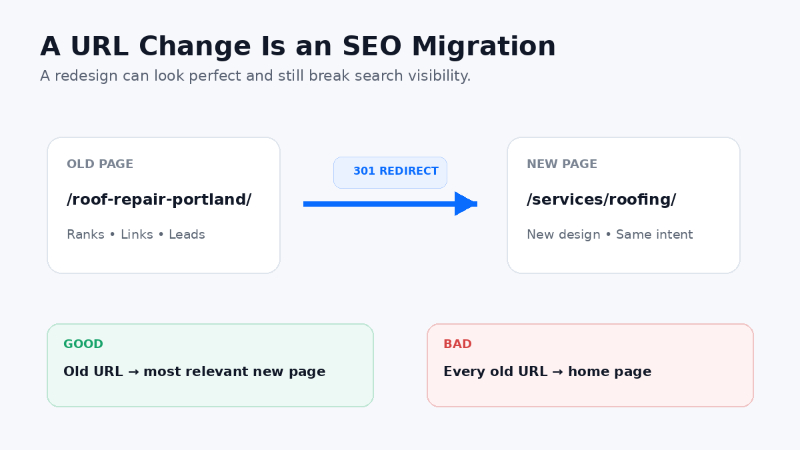
Imagine you own a roofing company. Your old website has been online for eight years and has a page at /roof-repair-portland/. That page ranks well in Google, has links pointing to it, and generates leads every month. During a redesign, the developer creates a cleaner site structure and changes the page to /services/roofing/. From a design and organization standpoint, that may make perfect sense.
But if the old URL simply disappears without a permanent redirect, Google and anyone clicking an old link may hit a 404 page. The new page then has to build search visibility largely from scratch. Google specifically recommends mapping old URLs to their new destinations and using permanent server-side redirects when URLs change during a site move. Google also recommends updating internal links, canonicals, and sitemaps to the new URLs.
That is not really a web design issue. It is an SEO migration issue.
Google’s site migration documentation goes into much more detail about how URL changes should be handled.
Developers and SEOs Are Looking at Different Things
Think about building a house. The person installing your electrical system and the person installing your roof are both important, and they are both working on the same house, but you probably wouldn’t assume that one automatically specializes in the other. Web development and SEO are similar.
A developer may be focused on the content management system, templates, responsive design, JavaScript, plugins, forms, database performance, hosting, and security. An SEO may be looking at crawlability, indexation, redirects, internal linking, page titles, canonical tags, structured data, search intent, XML sitemaps, content duplication, backlinks, and whether important pages are still visible to search engines.
There is overlap, especially with experienced developers who understand technical SEO, but you should not assume that SEO is automatically being handled just because someone is building the website. This is one of the reasons I include technical review and implementation planning in my website SEO audits.
Example: The New Website Accidentally Blocks Google
This sounds extreme, but I have seen versions of it happen more than once. During development, teams commonly prevent search engines from indexing a staging website. That is the right thing to do because you do not want Google indexing a half-finished copy of your site. The problem happens when the site launches and that block is never removed.
Maybe a noindex directive is left in place. Maybe the robots.txt file still blocks crawling. Maybe a WordPress setting telling search engines not to index the site stays turned on. To a visitor, the new website may look completely normal. To Google, however, you may have just told it not to include the site in search.
Google calls out leftover noindex tags and robots.txt blocks as common site-migration mistakes. That is exactly the kind of issue I want checked immediately before and after a launch.
Example: Every Old Page Redirects to the Home Page
Another common shortcut is redirecting dozens or hundreds of deleted URLs to the home page. It feels logical because the old page is gone, so at least visitors are being sent somewhere. But that is usually not the best solution.
If an old page about commercial roofing is being replaced, it should redirect to the most relevant new commercial roofing page. If an old SEO service page is being replaced, it should redirect to the new SEO service page. Google advises against redirecting lots of unrelated old URLs to one irrelevant destination, such as the home page. Redirects should make sense both to the person clicking the old link and to the search engine trying to understand what happened to the page.
Example: The Website Loses Its Internal Links
Internal links are another easy thing to overlook during a redesign. Let’s say your old website has ten blog posts that naturally link to your main SEO services page. Those links help visitors find the service, but they also help search engines understand that the service page is important and related to those topics.
During a redesign, the content gets moved into new templates and many of those contextual links disappear. The website still works and nothing looks broken, but the way authority and context move through the site has changed. That is why I look at internal linking as part of the site architecture, not just something writers occasionally add to a blog post.
If you are trying to grow organic visibility, your most important service and product pages should not be buried three or four clicks away with very few internal links pointing to them.
Example: The Developer Rewrites All the Page Titles
This one happens because page titles often look like a small detail. Maybe the old title is Emergency Plumber in Portland, OR | ABC Plumbing, and during the redesign it becomes Plumbing | ABC. The new title looks cleaner in the browser tab, but it may have removed much of the context that helped search engines and users understand the page.
The same thing can happen with headings, copy, meta descriptions, image alt text, and service-area information. A redesign often involves shortening and simplifying content. Sometimes that improves the site, but sometimes it removes the information that was helping the page rank.
The answer is not to preserve every old sentence forever. The answer is to understand what is currently generating search visibility before changing it.
SEO Should Be Part of the Website Project Before Launch
The best time to think about SEO is not two weeks after the new website launches and traffic falls by 40%. SEO should be part of the project before development is finished. Before a redesign launches, I want to know which pages currently receive organic traffic, which URLs have backlinks, which pages generate leads, which keywords are driving visibility, and which pages Google has indexed.
Then I want a plan for what is happening to those pages. Are they staying, moving, being combined, or being deleted? If they are moving, where do the redirects go? That basic exercise can prevent a huge amount of unnecessary damage.
A Simple SEO Website Launch Checklist
You do not need to turn every website launch into a six-month SEO project. For many small and medium-sized sites, a basic launch process catches most of the major problems.
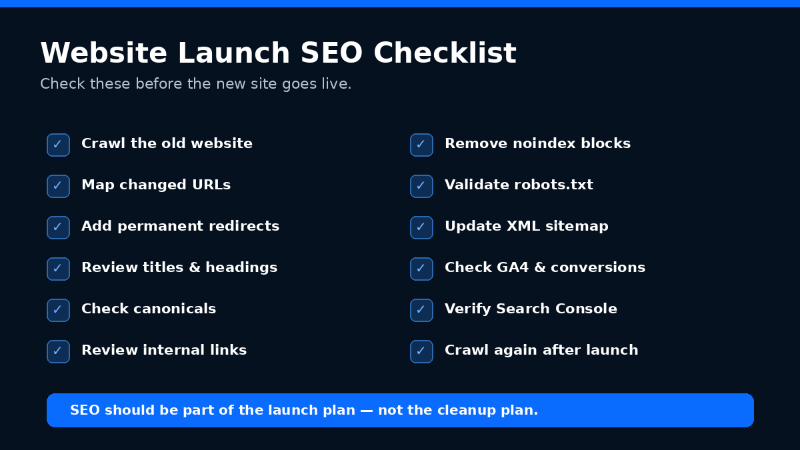
Before launch, crawl the old website and create a list of existing URLs. Identify the pages generating organic traffic and conversions, map any changing URLs to their new locations, and review page titles, headings, canonicals, internal links, and indexation settings. Make sure analytics and conversion tracking are ready as well.
After launch, crawl the new website again and test the redirects. Check for broken internal links and 404 errors, confirm the XML sitemap contains the correct URLs, and review the sitemap in Google Search Console. Use URL Inspection on important pages and monitor organic traffic, impressions, clicks, and indexation over the following weeks.
Google Search Console should be part of that process because it gives you direct visibility into how Google is crawling, indexing, and showing your website in search.
What Should Your Developer Handle?
I am not suggesting that every business needs to hire an SEO consultant to stand over a developer’s shoulder. Good developers are incredibly valuable, and many of them understand technical SEO very well. The important thing is to define responsibility before the site launches.
Ask your developer whether the project includes SEO migration planning. Ask who is responsible for redirects, whether metadata is being preserved, and whether someone is checking canonicals, indexation, the XML sitemap, robots.txt, structured data, and Search Console after launch.
If the answer is, “We don’t really handle SEO,” that is not necessarily a red flag. It is useful information because now you know someone else needs to be responsible for that part of the project.
SEO and Web Development Work Better Together
The best website projects I have worked on are not SEO versus development. They are SEO and development working together. The developer understands how the site is built, the SEO understands how search engines interact with the site and which existing pages have value, the designer understands the user experience, and the business understands which products and services actually matter.
When those pieces work together, you can improve the website without throwing away years of search visibility. This matters even more as search expands beyond traditional Google results. A clear site structure, strong service pages, accurate content, internal links, and technically accessible pages also help AI-driven search systems understand what your business does. I cover more of that in my AI Search Optimization Guide.
Your New Website Shouldn't Have to Start Over
A website redesign should improve the business. It should not require you to rebuild your organic traffic from zero. Before launching a new website, make sure someone is responsible for SEO. It may be your developer, your internal marketing team, or an outside SEO consultant. The important thing is that it is actually someone’s job.
Because “the developer probably handled it” is something you do not want to discover was wrong after the old website is already gone.
If you are rebuilding a website or have recently launched one and want to know whether anything was missed, my website SEO audits are designed to identify technical problems, lost opportunities, and the issues I would prioritize first. You can also contact me if you want to talk through a website launch or SEO problem.
Frequently Asked Questions
Is web development the same as SEO?
No. Web development focuses on building and maintaining the website, while SEO focuses on helping search engines crawl, understand, index, and rank the site. There is overlap, but they are different skill sets and should not automatically be treated as the same responsibility.
Can a website redesign hurt SEO?
Yes. A redesign can hurt organic visibility if important URLs change without redirects, content is removed, internal links disappear, pages become blocked from indexing, or important SEO elements are changed without understanding their existing value.
Should I do an SEO audit before redesigning my website?
Yes. A pre-launch SEO audit can identify the pages, URLs, rankings, backlinks, and technical elements that need to be protected during the redesign. It is usually much easier to prevent a traffic loss than to diagnose and recover from one after launch.
Do I need 301 redirects when launching a new website?
If an existing URL is permanently moving to a different URL, a permanent redirect is generally the right approach. The old page should redirect to the most relevant new destination rather than automatically sending everything to the home page.
How soon should I check SEO after a website launch?
Immediately. Important redirects, crawlability, indexation settings, analytics, Search Console, sitemaps, and key pages should be checked as soon as the new site goes live. Organic performance should then be monitored closely over the following days and weeks.
What is the biggest SEO mistake during a website redesign?
One of the biggest mistakes is launching without a URL migration plan. Existing pages may already have rankings, traffic, backlinks, and authority, so changing or deleting those URLs without a plan can cause avoidable traffic losses.
Can my developer handle SEO too?
Possibly. Many developers understand technical SEO very well. The important thing is to ask what is included in the project instead of assuming SEO is covered automatically.
What should be checked before a new website goes live?
At minimum, review redirects, crawlability, indexation settings, page titles, headings, canonical tags, internal links, XML sitemaps, analytics, conversion tracking, robots.txt, and the most important organic landing pages.
Is web development the same as SEO?
No. Web development focuses on building and maintaining the website, while SEO focuses on helping search engines crawl, understand, index, and rank the site. There is overlap, but they are different skill sets.
Can a website redesign hurt SEO?
Yes. A redesign can hurt organic visibility if important URLs change without redirects, content is removed, internal links disappear, pages become blocked from indexing, or important SEO elements are changed without understanding their existing value.
Should I do an SEO audit before redesigning my website?
Yes. A pre-launch SEO audit can identify the pages, URLs, rankings, backlinks, and technical elements that need to be protected during the redesign. It is usually easier to prevent a traffic loss than to diagnose one after launch.
Do I need 301 redirects when launching a new website?
If an existing URL is permanently moving to a different URL, a permanent redirect is generally the right approach. The old page should redirect to the most relevant new destination instead of automatically sending everything to the home page.
How soon should I check SEO after a website launch?
Immediately. Important redirects, crawlability, indexation settings, analytics, Search Console, sitemaps, and key pages should be checked as soon as the new site goes live. Organic performance should then be monitored closely over the following days and weeks.
What is the biggest SEO mistake during a website redesign?
One of the biggest mistakes is launching without a URL migration plan. Existing pages may already have rankings, traffic, backlinks, and authority. Changing or deleting those URLs without a plan can cause avoidable traffic losses.
Can my developer handle SEO too?
Possibly. Many developers understand technical SEO very well. The important thing is to ask what is included in the project instead of assuming SEO is covered automatically.
What should be checked before a new website goes live?
At minimum, review redirects, crawlability, indexation settings, page titles, headings, canonical tags, internal links, XML sitemaps, analytics, conversion tracking, robots.txt, and the most important organic landing pages.